

Search engine optimization is no longer about guesswork. It is about precision, data analysis, and extracting insights from massive datasets. One of the most powerful yet underutilized tools in an SEO professional’s toolkit is regular expressions, commonly known as regex.
When used correctly in Google Search Console, regex allows you to filter, segment, and analyze search performance data at a highly granular level. Instead of manually sorting through thousands of keywords, you can instantly isolate patterns, identify opportunities, and uncover hidden trends.
This guide explains everything you need to know about regex in Google Search Console, how it works, how to apply it effectively, and whether regex can be used directly in Google Search itself.
What is Regex?
Regular expressions (regex) are sequences of characters that define search patterns. These patterns are used to match, filter, or manipulate text based on specific rules.
In simple terms, regex helps you:
- Find patterns in large datasets
- Filter specific types of queries
- Group similar keywords together
- Exclude irrelevant data
For SEO, this becomes extremely powerful because search queries often follow patterns such as:
- Brand vs non-brand queries
- Question-based searches
- Location-based keywords
- Product-specific terms
Regex allows you to isolate all of these instantly.
Why Regex is Important for SEO
Modern SEO relies heavily on data interpretation. Google Search Console provides valuable insights, but without regex, analyzing large datasets becomes inefficient.
Regex helps you:
1. Save Time
Instead of manually filtering thousands of queries, regex automates pattern matching.
2. Improve Keyword Analysis
You can group keywords based on intent, structure, or themes.
3. Discover Hidden Opportunities
Regex reveals long-tail keywords, question-based queries, and emerging trends.
4. Segment Data Accurately
You can isolate branded vs non-branded traffic, informational vs transactional queries, and more.
Can You Use Regex in Google Search?
This is where many people get confused.
Short Answer:
No, you cannot use full regex directly in Google Search.
Explanation:
Google Search supports basic search operators such as:
- Quotation marks for exact matches
- Minus sign for exclusions
- OR for alternatives
However, it does not support advanced regex syntax like:
- Character classes
- Quantifiers
- Anchors
Regex is specifically supported in tools like:
- Google Search Console
- Google Analytics (GA4)
- Data analysis platforms
So while you cannot use regex directly in Google Search, you can use it in Google Search Console to analyze how users are searching.
How to Use Google Search Console
Before diving into regex, you need to understand how Google Search Console works.
Step-by-Step Overview
- Log in to Google Search Console
- Select your property (website)
- Go to the “Performance” report
- View data such as:
- Queries
- Pages
- Countries
- Devices
- Apply filters to refine your data
This is where regex comes into play.
How to Use Regex in Google Search Console
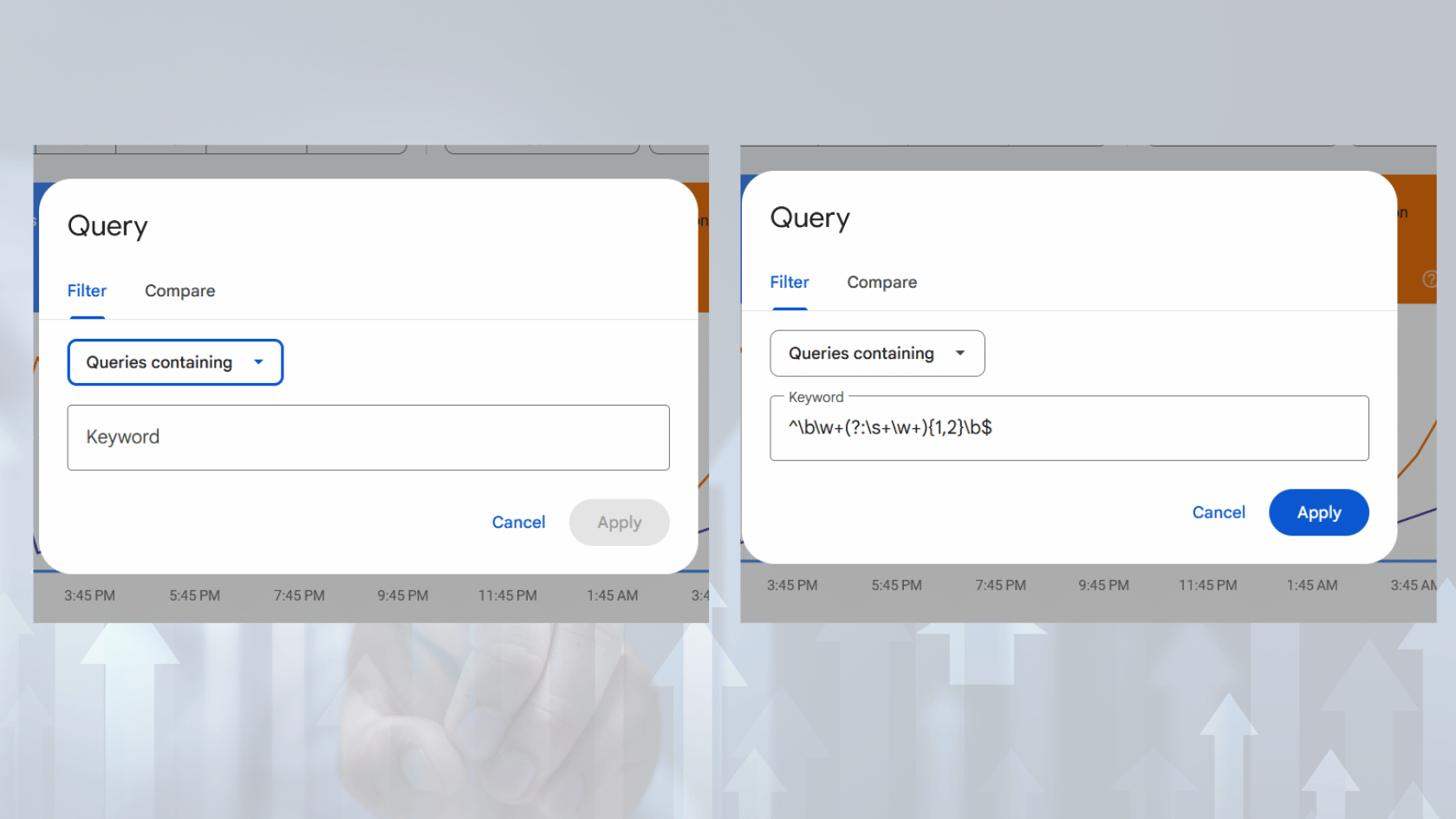
Google Search Console introduced regex support to allow advanced filtering of performance data.
Where to Use Regex
You can apply regex in:
- Query filters
- Page filters
How to Apply Regex
- Open the Performance report
- Click “+ New”
- Select “Query” or “Page”
- Choose “Custom (regex)”
- Enter your regex pattern
Basic Regex Syntax You Must Know
Before using regex, you need to understand the core building blocks.
1. Dot (.)
Matches any single character
Example: a.b matches “acb”, “a1b”
2. Asterisk (*)
Matches zero or more of the previous character
Example: go*gle matches “ggle”, “google”, “gooogle”
3. Plus (+)
Matches one or more occurrences
Example: go+gle matches “google”, “gooogle” but not “ggle”
4. Question Mark (?)
Makes the preceding character optional
Example: colou?r matches “color” and “colour”
5. Pipe (|)
Acts as OR
Example: seo|marketing
6. Caret (^)
Matches the beginning of a string
Example: ^how matches queries starting with “how”
7. Dollar ($)
Matches the end of a string
Example: guide$ matches queries ending with “guide”
Practical Use Cases of Regex in Google Search Console
Now let’s get into real SEO use cases.
1. Filter Branded vs Non-Branded Queries
Branded Regex Example:
yourbrand|your brand name
Non-Branded Regex:
^(?!.*yourbrand).*
This helps you separate traffic coming from brand awareness vs organic discovery.
2. Find Question-Based Keywords
Regex:who|what|when|where|why|how
This helps identify informational queries and content gaps.
3. Analyze Long-Tail Keywords
Regex:\b\w+\b.*\b\w+\b.*\b\w+\b
This captures multi-word queries, which often have higher conversion intent.
4. Identify Product or Service Keywords
Regex:buy|price|cost|service|hire
This isolates transactional keywords that indicate strong intent.
5. Group Similar Keywords
Example:seo|search engine optimization
This allows you to combine keyword variations into one analysis group.
6. Exclude Irrelevant Traffic
Regex:^(?!.*free).*
This removes queries containing “free” if you are targeting paid services.
7. Analyze Location-Based Queries
Regex:nepal|kathmandu|pokhara
This helps track local SEO performance.
Advanced Regex Strategies for SEO
Once you understand the basics, you can start combining patterns.
Combine Multiple Conditions
Example:(buy|hire).*(seo|marketing)
This finds queries containing buying intent and SEO-related terms.
Use Case: Content Gap Analysis
Regex:how to|guide|tutorial
Filter queries and check which ones have impressions but low clicks. That’s your content opportunity.
Use Case: CTR Optimization
Find queries with:
- High impressions
- Low click-through rate
Then rewrite titles and meta descriptions accordingly.
Common Mistakes When Using Regex
Even experienced users mess this up.
1. Overcomplicating Patterns
Keep regex simple. Complex patterns increase the risk of errors.
2. Ignoring Case Sensitivity
Google Search Console regex is case-insensitive by default, but always test.
3. Not Testing Patterns
Always validate your regex before applying it broadly.
4. Using Incorrect Anchors
Using ^ and $ incorrectly can filter out too much data.
Best Practices for Using Regex in SEO
1. Start Simple
Begin with basic patterns and gradually build complexity.
2. Use Clear Objectives
Know exactly what you want to extract before writing regex.
3. Document Your Patterns
Maintain a list of commonly used regex filters.
4. Combine with Data Analysis
Regex is powerful, but insights come from interpretation.
Regex in Google Search vs Google Search Console
| Feature | Google Search | Google Search Console |
|---|---|---|
| Regex Support | No | Yes |
| Purpose | Search results | Data analysis |
| Filtering Power | Limited | Advanced |
| SEO Use Case | Query execution | Query analysis |
Real-World SEO Workflow Using Regex
Here’s how professionals actually use regex in daily SEO work:
- Export Search Console data
- Apply regex filters
- Segment keywords by intent
- Identify gaps and opportunities
- Optimize existing content
- Create new targeted content
This workflow significantly improves efficiency and results.
How Regex Improves SEO Performance
When used correctly, regex directly contributes to:
- Better keyword targeting
- Improved content relevance
- Higher click-through rates
- Stronger topical authority
- Faster data analysis
In short, it gives you control over your data.
Conclusion
Regex is not optional anymore if you are serious about SEO. It is one of those skills that separates average practitioners from high-performing professionals.
Google Search Console already gives you powerful data. Regex simply unlocks its full potential. Once you start using it consistently, you will realize how much time you were wasting on manual analysis.